All AIAIAI transmitters are designed to provide a cable-free, ultra-low latency audio experience using W+ Link technology. Each transmitter is bundled with compatible wireless products to ensure seamless setup.
In this article goes through the transmitters compatibilities, and each transmitters product manual.
Transmitter compatibility overview
This chart explains which AIAIAI transmitters (X02, X03, X04) work with which products and how many devices you can connect simultaneously.
| Transmitter | Compatible products | Included in | Key features |
X02 | - H10 Headband - UNIT-4 MKI+MKII Studio Monitor | UNIT-4 Wireless+ Studio Monitor (pair) | USB-C Powered Audio input via USB-C and mini jack Can connect to 2 devices simultaneously |
| X03 | - S11 Speaker units | TMA-2 DJ Wireless TMA-2 Studio Wireless | Battery powered Audio input via TRS line in or USB-C |
| X04 | - H10 Headband - UNIT-4 MKI+MKII Studio Monitor | UNIT-4 Wireless+ Studio Monitors (pair) | Battery powered Audio input via USB-C and mini jackCan connect to 2 devices simultaneously |
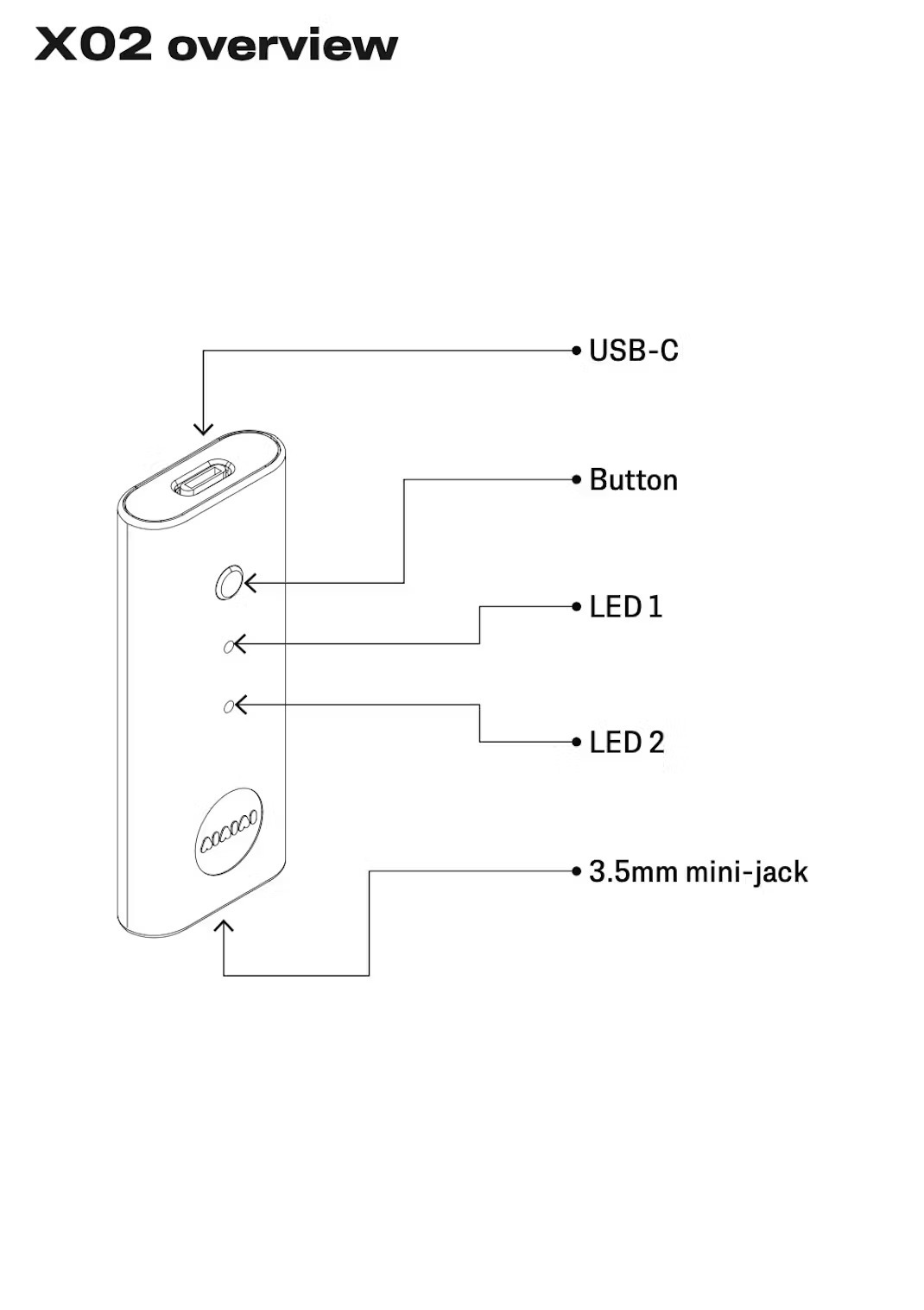
Compatible with H10 Headband + UNIT-4 MKI + MKII
General
Connecting to audio using USB-C: X02 will power on when connected
Connecting to audio using 3.5mm mini-jack:
Connect the USB-C socket to a 5V/>2A adapter (for example a phone charger or power bank).
Connect to audio
Connect to your audio source using the USB-C or 3.5mm mini-jack sockets on X02.
Pairing
First put the device(s) you wish to connect to in pairing mode.
The first time X02 is powered on, it will start in pairing mode automatically.
LED 1 is solid white when the first device pairs. If you have a second device, LED 2 is solid white when it pairs.
To enter pairing mode manually, hold the button on X02 for 2 sec.
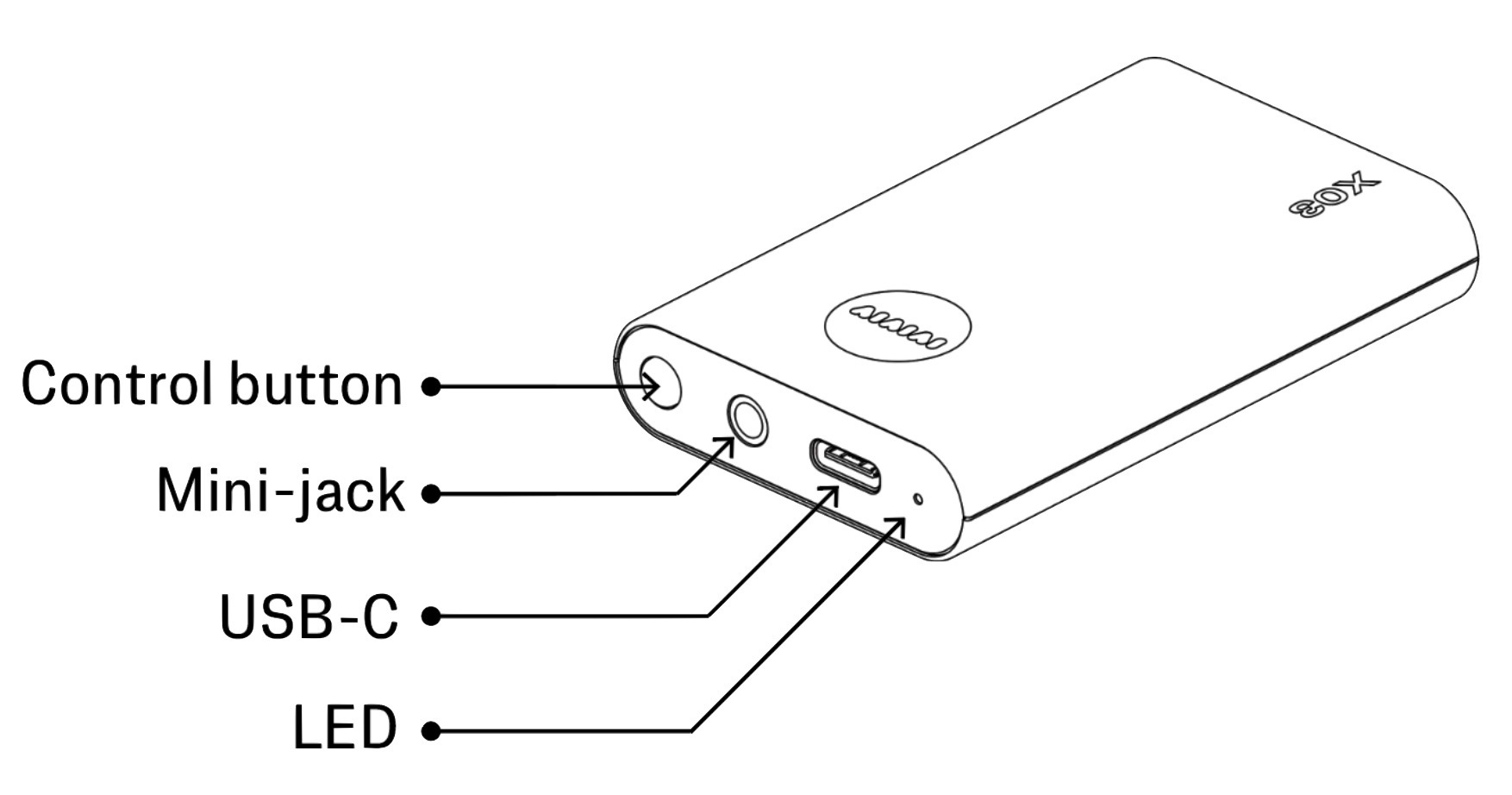
Compatible with S11 Speaker unit
Button Functions
Turn on X03: Hold the button for 2 seconds, until the LED turns on.
Turn off X03: Hold the button for 2 seconds, until the LED turns off.
Check battery level: Push the button once.
Red: <10 hours.
Amber: 10-20 hours.
Green: 20+ hours.
Enter pairing mode: With power off, hold the button for 4 sec, until the LED starts flashing fast.
Reset S11 paired devices: With power off, hold the button for 8 sec. The LED will flash fast when reset.
LED FEEDBACK
State | LED Feedback |
Not paired (Idle mode) | LED flashing white (1 sec on, 1 sec off, loop) |
Pairing mode | LED flashing white (0.3 sec on, 0.3 sec off, loop) |
Paired | Constant white |
Reset paired device list | LED flashing fast 5 times (0.1 sec on, 0.1 sec off) |
Battery status (power on) | Push the control button. Battery is displayed for 3 sec. 20 - 40 hours - Constant green 10 - 20 hours - Constant amber 3 - 10 hours - Constant red 0 - 3 hours - Flashing red (0.3 sec on, 0.3 sec off) |
Low battery indicator (power on) | Flashing red (0.3 sec on, 0.3 sec off) |
Charging (power on) | Battery status is shown for 3 sec after USB-C charger connected Check battery status by pressing the button |
Charging (power off) | Fully charged - Constant green 20 - 40 hours - Flashing green (1 sec on, 1 sec off) 10 - 20 hours - Flashing amber (1 sec on, 1 sec off) 0 - 10 hours - Flashing red (1 sec on, 1 sec off) |
Compatible with UNIT-4 MKI + MKII and H10 Headband
Power on/off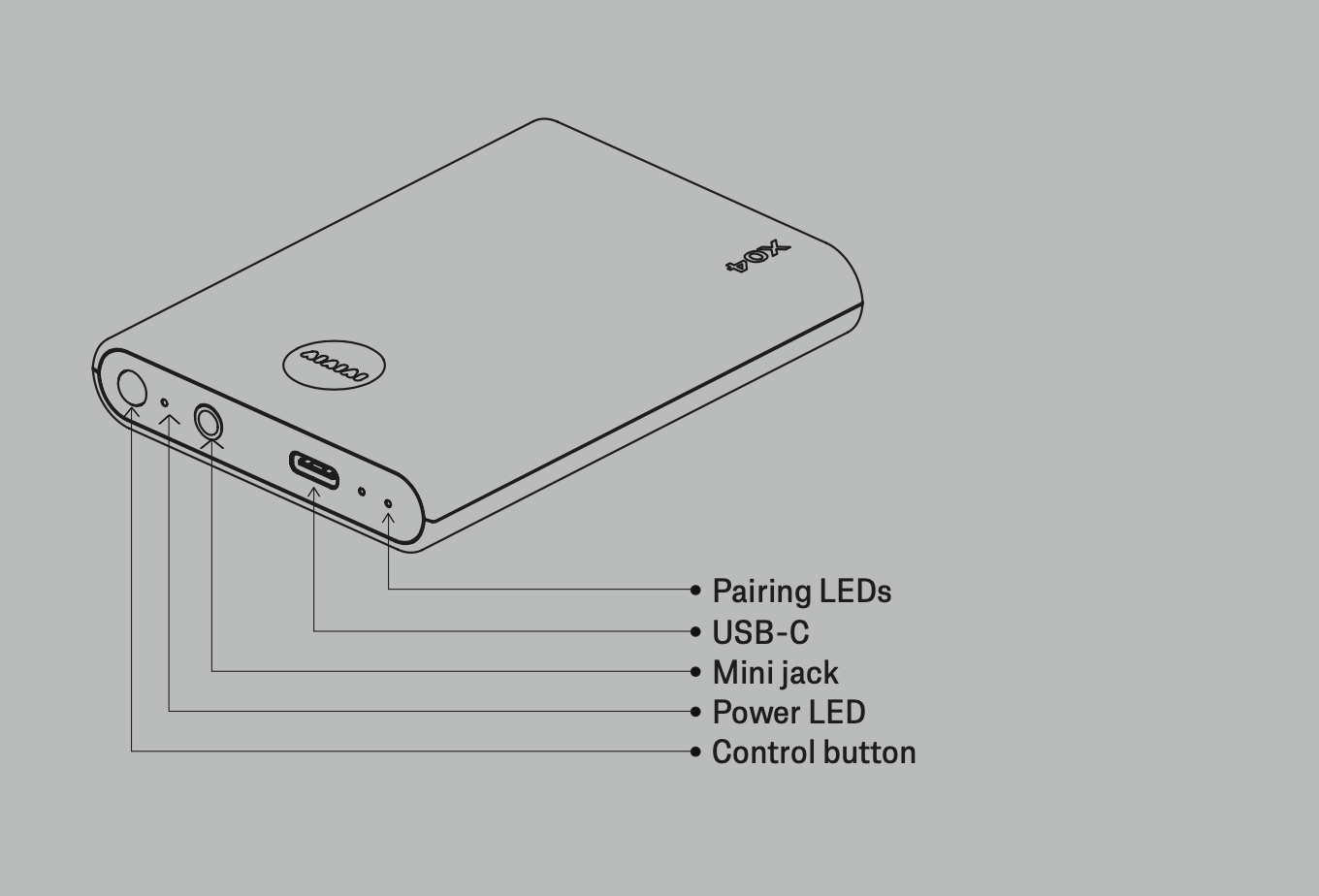
Hold the control button until the power LED turns on.
Pair to a Wireless+ device
X04 will start in pairing mode the first time.
Both pairing LEDs will be flashing fast.
H10: H10 will start in pairing mode the first time. H10 and X04 will
pair automatically.
Check your H10 or UNIT-4 Quick Start Guide for further pairing
instructions.
Connect to audio
Connect to your audio source using the USB-C or 3.5mm
mini-jack socket on X04.
Pairing mode
Double press the control button.
Check battery level
Check the power LED.
Red: <5 hours / Amber: 5-10 hours / Green: 10+ hours
Offers
- 12 hours of playback time (2 devices), 20 hours (1 device)
- Uncompressed wireless audio, only 16ms latency
- Dual connection (compatible with 2 UNIT-4s)
- 3.5mm jack (audio in)
- USB-C (audio in and charging)
- Available in black and white
Specs
| W+ Link latency | 16 ms |
| W+ Link transmitter playback time | 18 hours |
| W+ Link transmitter input | USB-C, 3.5mm TRS mini-jack |
| W+ Link operating range | 12 m |
| W+ Link compatibility | H10 and UNIT-4. Up to 2 devices. |
| Charging time | 2 hours |
Product Manuals - PDF Download
Was this article helpful?
That’s Great!
Thank you for your feedback
Sorry! We couldn't be helpful
Thank you for your feedback
Feedback sent
We appreciate your effort and will try to fix the article